
Effort and thinking are two settings. Here is what each one does to your answers.
You pick a model, type your question and hit send. Most people stop there. But under the model name there are two more settings, and they decide how much work Claude puts into every answer before it hands it back.
One of them is called effort and the other is called thinking. They sound like the same thing and they are not, and getting them right is the cheapest way to make your weekly usage last.
Where they are
Click the model name next to the send button, then choose Effort. That is the whole path, according to Anthropic's help center, which I read on October 4, 2026. The same page says you can change the model, the effort level or the thinking setting at any point in a conversation, and that a change applies starting with Claude's next response.
What effort does
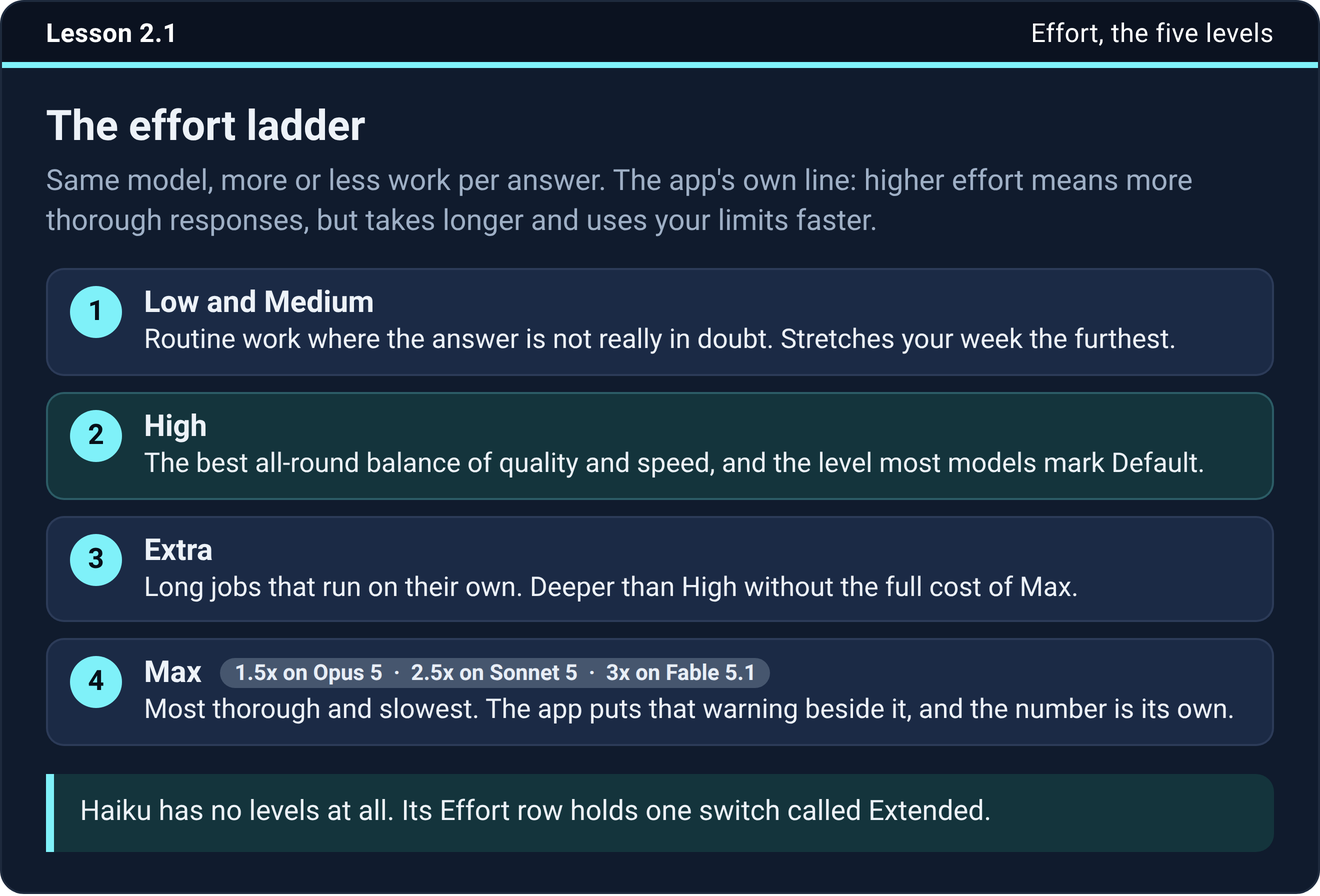
Effort does not change which Claude you are talking to. It changes how much work that Claude does on each answer. The help center puts it this way: higher effort means more thorough responses, but they take longer and use more tokens, so you reach your usage limits faster.
The levels are Low, Medium, High, Extra high and Max. Low and Medium are for routine work where the answer is not in doubt. High is marked Default on most models and gives the best balance of quality and speed. Extra high is available on Opus 4.7 and newer, and in the app it just says Extra. Max is the most thorough option, for work that has to be right and where you can wait. As of October 4, 2026 the help center lists effort for Sonnet 5.5, Opus 5.5, Fable 5.1, Opus 5, Sonnet 5, Fable 5, Opus 4.7, Opus 4.6 and Sonnet 4.6.
Each model has one level marked Default, and that is the one Anthropic tuned for it. The Default badge and the tick are two different marks. The badge is the recommendation and never moves. The tick is where you are set right now, and it can end up somewhere else after a few model switches. Read the tick, and if it does not match the badge and you have no reason for it, move it back.
What thinking does
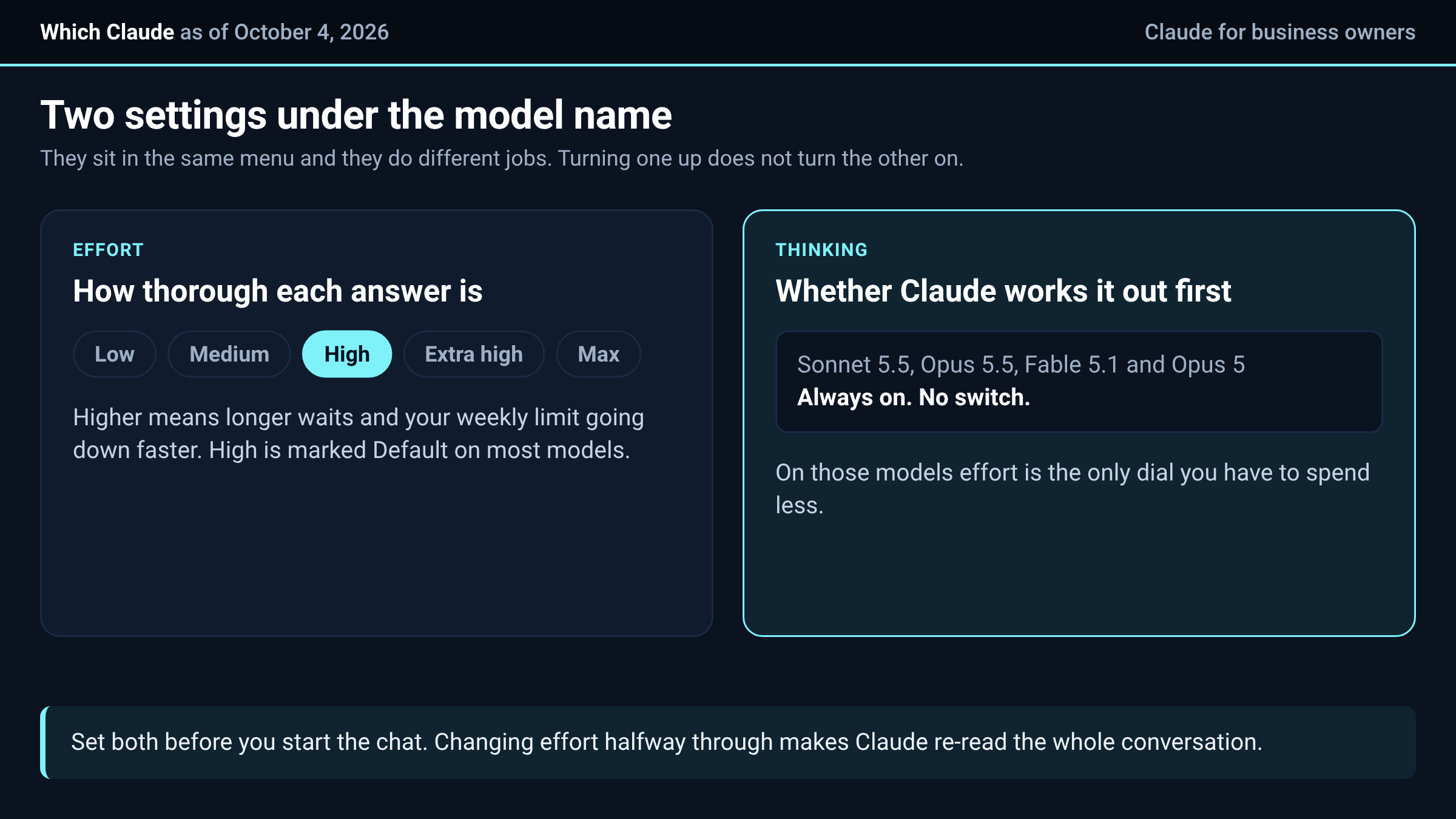
Thinking is the second setting. With it on, Claude works the problem out first and writes the answer second. You see a Thinking line with a timer while it works, and an expandable Thinking section above the answer that you can open when the result matters and you want to see how it got there.
Here is the part that catches people. The help center says thinking cannot be turned off in Claude when you use Sonnet 5.5, Opus 5.5, Fable 5.1 or Opus 5. On older models there is a switch. So the old tip to turn thinking off to save usage does nothing on the models most people use now. If you want to spend less on those, the lever is the effort level, or a lighter model.
Effort and thinking are separate. Turning effort up does not turn thinking on, and turning thinking on does not raise effort. On the models where thinking is always on, effort is the only dial you have left.
What Max costs
When you pick Max, the app puts a warning next to it with a usage number, and the number is different on every model. On September 14, 2026 the course recorded 1.5x or more on Opus 5, 2.5x or more on Sonnet 5 and 3x or more on Fable 5.1. Read those as multipliers on your weekly limit. Models have changed since then, so read the number the app shows for the model you picked before you choose Max.
An afternoon at Max on a big model can take a real bite out of your week. Save it for work where a wrong answer costs more than a long wait, such as a contract summary, a pricing model or a plan you are about to act on. A routine email draft does not need it.
What changing mid-chat costs
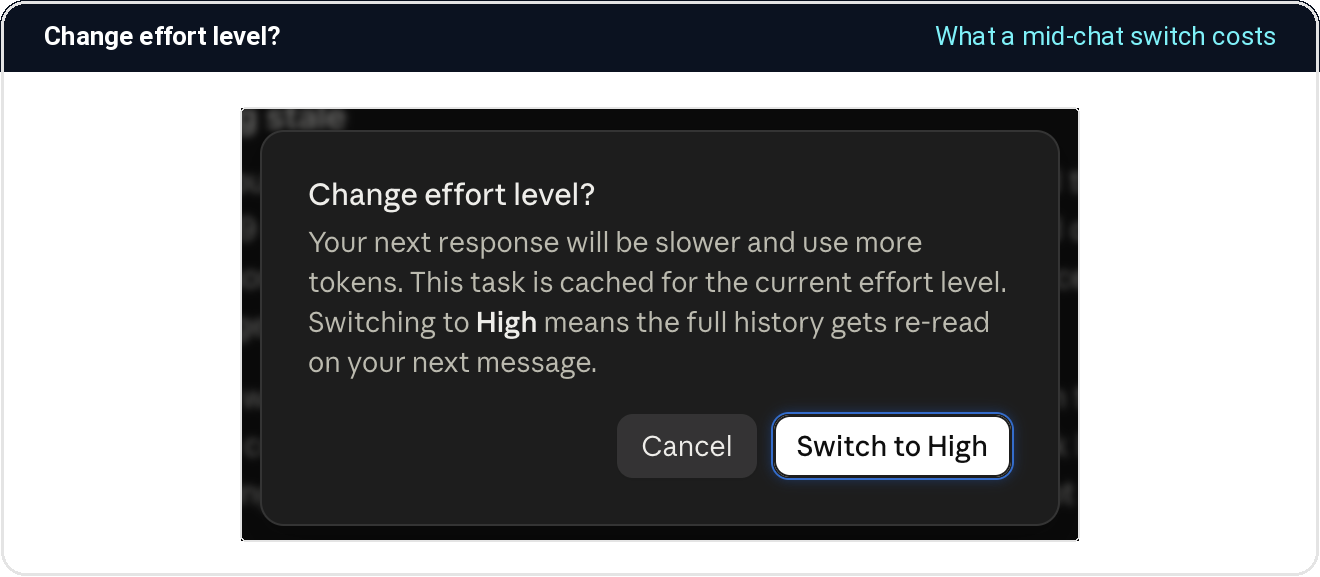
If you change the model or the effort halfway through a conversation, the app warns you. On September 14, 2026 the box said your next response will be slower and use more tokens, because the task is cached for the current effort level and switching means the full history is re-read on your next message.
The cost is the same going up or down. Dropping from Max to High partway through a long chat to save usage can cost more than leaving it alone would have, because of the re-read.
So the rule is short. Set it before you start, which takes two seconds. If you are deep in a long chat and the setting is wrong, start a new chat and carry across the file or a short summary. If you do change it mid-chat, change it once, before your next big message.
Try it now
Open the picker on the model you use most and find the Default badge. Then find the tick. If they sit on different levels and you have no reason, move the tick back to the badge. Then open a chat you have not started yet, ask for something big, and look at the picker before you send it.
The next step
Pick one job you do every week, set the effort for it on purpose, and write it down so the choice is made once.
The settings, the folder and the rest of the setup are covered in the course inside Teach Claude Your Business, where you onboard Claude like a new hire in one sitting and keep everything it builds. It is free to join.
Join Teach Claude Your Business
Sources: Change the model, effort, and thinking settings, Claude help center, read October 4, 2026. The Max numbers and the mid-chat warning are from the Pick the Right Claude mini course, lessons 2.1 to 2.3, checked September 14, 2026.

