
Skills are the checklist Claude follows for a job. Here is what goes in one.
Ask Claude for your Friday client update three weeks in a row and you will get three different updates. The facts might be right each time. The order, the length and the sign-off change, because Claude works out the steps fresh whenever you ask.
A good employee does not work that way. They have a checklist for the monthly close and a script for a sales call. A skill is that checklist, written down where Claude can find it.
What a skill is
Anthropic's help center, which I read on October 4, 2026, defines skills as folders of instructions, scripts and resources that Claude loads dynamically to improve performance on specialized tasks. In plain words, it is a written procedure that Claude opens when your request matches the job.
A skill is a folder with one required file called SKILL.md. The file starts with a name, up to 64 characters, and a description, up to 200 characters. Under those come the steps, the files to read first, the format of the finished work and the checks to run before handing it back. Most of the skills you make will be that one file.
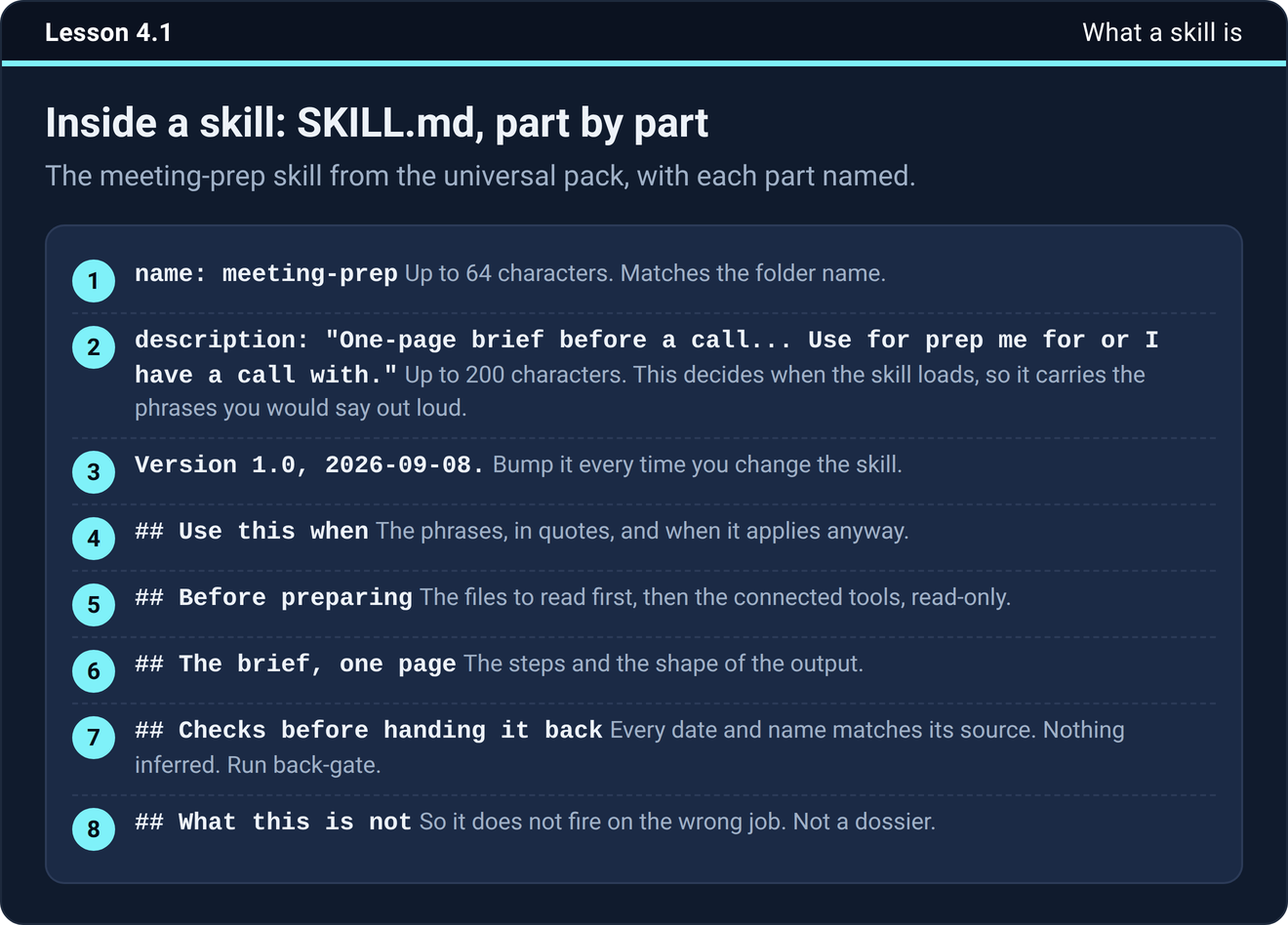
How Claude picks one
Claude sees the name and description of every skill you have turned on. When your request matches a description, it opens that skill and follows it. The help center calls this progressive disclosure, which means Claude reads the short descriptions first and loads the full instructions only for the skill it needs.
That makes the description the part that matters most. Write it with the phrases you would say out loud, like "prep me for a call" or "pull the numbers." You can also ask for a skill by name, which helps when a job could match two of them.
What goes in and what stays out
The steps that never change go in, and so do the files to read first, the format and the checks. Facts that change stay out. Prices, the team and this quarter's priorities belong in your folder files, and the skill says to read them. A skill with a price written inside it is wrong the day the price changes.
The help center adds one more warning for anyone writing skills. Do not hardcode sensitive information such as API keys or passwords in a skill file.
When to make your first one
The course has a simple rule. The third time you ask for the same kind of job, it becomes a skill. Twice might be a coincidence, and three times means the business does that job.
The easiest way is to let Claude write it. After a job comes out the way you wanted, say "Package what we just did into a skill." Claude shows a proposal card, you tap Review, read it, and save it from the panel that opens. Then check what it wrote against this list.
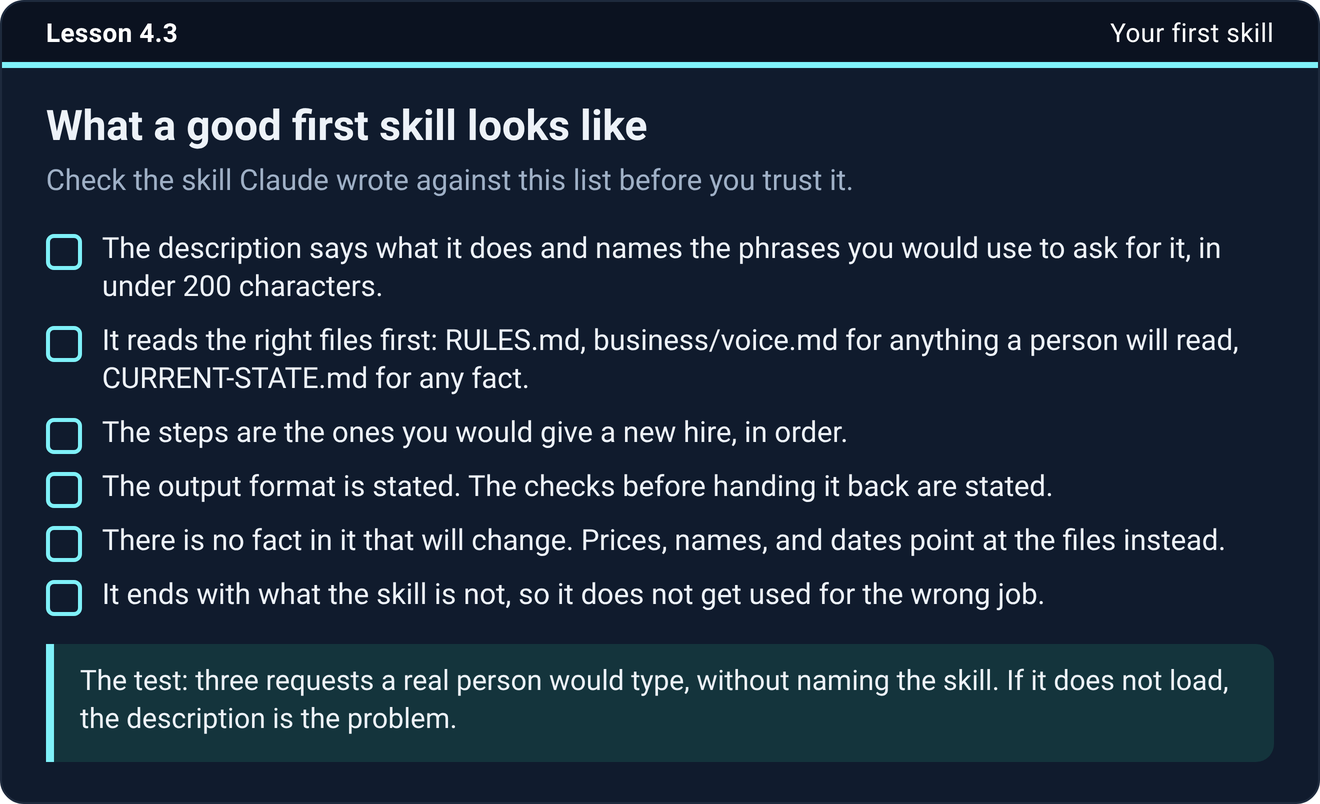
The last item on that list is worth a moment. A skill that says what it is not for stays out of the wrong jobs. And test it before you trust it. Give Claude three plain requests a real person would type, without naming the skill, and see whether it loads. If it does not, the description is the problem, so say the job more plainly and add the phrase you used.
Reading someone else's skill before you install it
Customize has a Discover view full of skills written by other people. Some are good. Installing one is a bigger decision than it looks, because Claude follows the skill with whatever the session can reach, which includes your folder and your connected tools. It is closer to handing a contractor your keys than to downloading a font.
The help center says to review any skills you download before enabling them. The course turns that into a two-minute read of the skill's Contents, with five questions.
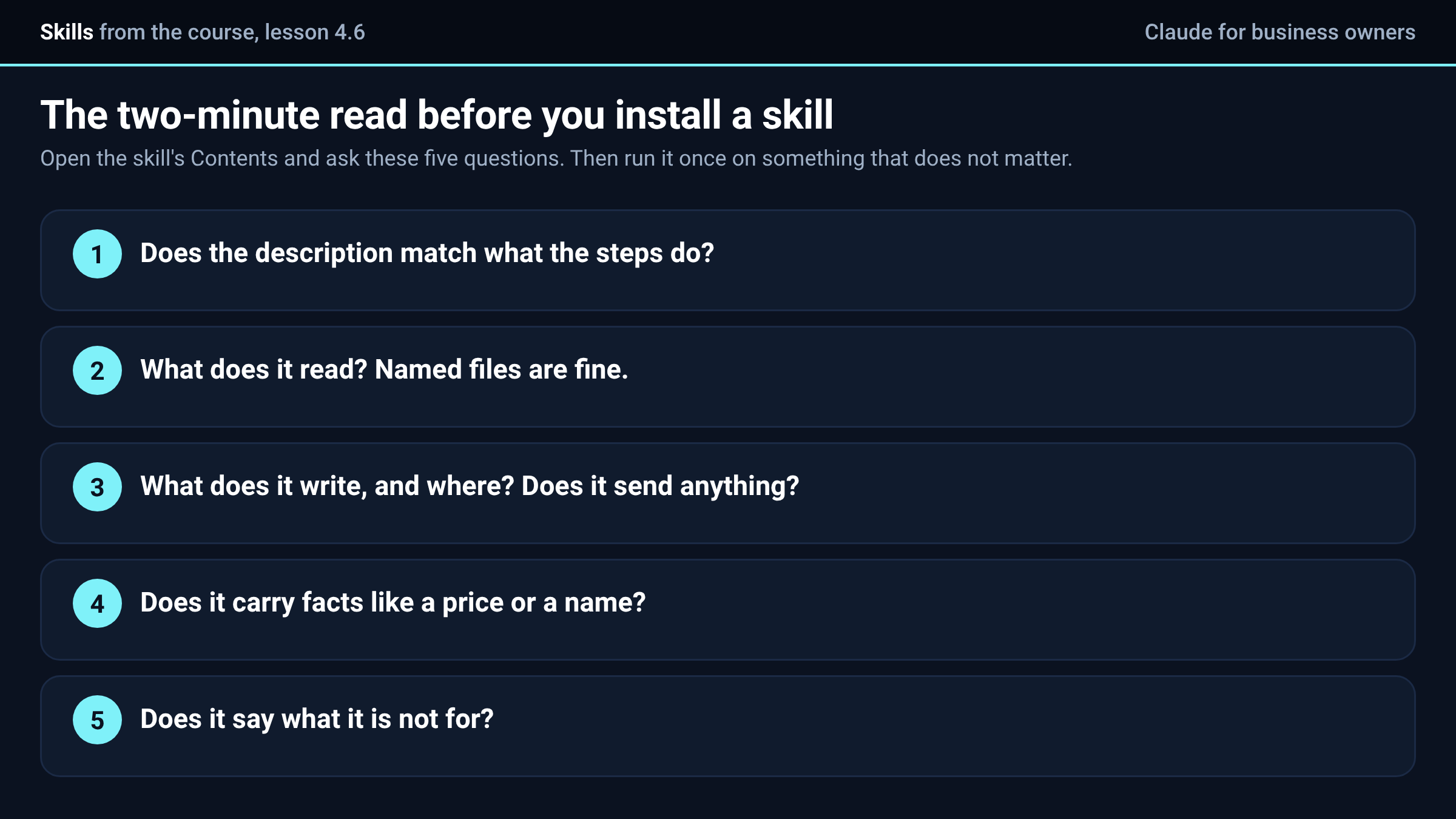
After the read, run it once on something that does not matter, with the mode set to Manually approve so you see every step. Use a test record or last month's numbers. Read what it did, and not only what it handed back. If it touched something you did not expect, remove it. Keep somebody else's skill turned off unless you are using it, because every skill that is on is one more thing Claude can reach for.
Where you add one
Skills work on Free, Pro, Max, Team and Enterprise plans, and the help center says they need code execution turned on. Open Customize, then Skills, and click Add to upload a zipped skill folder. Each skill gets a row with an on and off switch. The course also keeps the source of every skill in a skills folder in your own working folder, so you can read it, change it and reinstall it.
Try it now
Open Customize, then Skills, and look at what is already there. Pick the job Claude did best for you this month and say "Package what we just did into a skill." Read the proposal before you save it.
The next step
Run the three-request test on that skill this week, and fix the description until all three requests load it.
The two gates, the starter skills and the skill for your own jobs are built in the course inside Teach Claude Your Business, where you onboard Claude like a new hire in one sitting and keep everything it builds. It is free to join.
Join Teach Claude Your Business
Sources: What are skills? and How to create custom skills, Claude help center, read October 4, 2026. The third-time rule, the proposal card and the two-minute read are from Onboard Claude lessons 4.1, 4.3 and 4.6.

